Frontend Settings
The settings in the Frontend section are used to configure details related to GUI sessions.
Allowed API clients
Comma-separated values specifying the clients that are allowed to connect to the Key Manager API.
For example: ssh-mgr-client,curl
Authorizations filtering on key level
Perform authorizations listview filtering on key level (when applicable) instead of the fingerprint level. Returns more specific results but is also slower in large environments.
Expire session after inactivity
Session-inactivity timeout. Specified in seconds (minimum 120). After the specified time has passed, the Key Manager administrator is automatically logged out of the GUI.
Header color
The color of the header element on GUI pages. This can be useful in situations where Key Manager administrators are operating multiple Key Manager deployments that need to be distinguishable from each other.
Instance name
Choose a custom name for the Key Manager instance to be displayed in the navigation bar.
Maximum API token expiration period
Maximum API token expiration period. Must be an integer with an optional unit of y (years), m (months), w (weeks), d (days), H (hours), M (minutes), or S (seconds). The default unit is S.
Maximum rows in downloaded CSV
Maximum number of rows included in downloaded CSV files (minimum 1). If CSV data exceeds this number of lines, no data is included in the downloaded file. Instead, a message like the following is provided in the downloaded file:
Your CSV Download returned 20000 items, limiting count to 10000 please use
the command line client to get the full list as CSV or change the max csv setting.
Key Manager may take considerable time to generate CSV files from large data sets. CSV data can be obtained more efficiently using the listing commands via the Key Manager command-line client. For more information about command-line client usage, see Command Line Use.
Number of items per page in list views
The maximum number of list items displayed in a list. Additional entries are paginated.
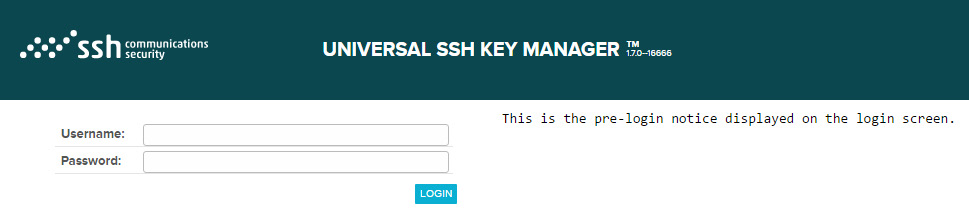
Pre-login notice
Specifies a free-text message to be displayed on the login page. The message is visible to everybody who accesses the login page.
Post-login notice
Specifies a free-text message to be displayed immediately after a successful login.

PKM frontend base URL
Base URL for PKM frontend server. Used in PDF reports to generate links to PKM UI.