Creating a Key Manager Administrator Account
This section illustrates how to perform your first login using the superuser account that was created during Key Manager setup, and how to create your own Key Manager administrator account. The example demonstrates the following topics:
-
Logging into the Key Manager GUI.
-
Creating a new Key Manager administrator account.
-
Logging out of the Key Manager GUI.
-
Access the Key Manager GUI using a web browser. For example, if your Key Manager front end is located at the address keymanager.example.com, navigate to https://keymanager.example.com to access the GUI. Perform your first login using the superuser account and password, which were created during Key Manager setup.

Figure 2.2. The Key Manager Login Screen
You can use the following browsers for accessing the GUI:
- Latest & stable Mozilla Firefox
- Latest & stable Chrome
- Latest & stable Chromium-based Microsoft Edge
After successful login, you will be redirected to the Home→System page of the Key Manager GUI.
-
For security reasons, the superuser account should not be used for general key or account management. For this reason, we create a separate Administrator account for performing further management operations. To do this, click create an account.
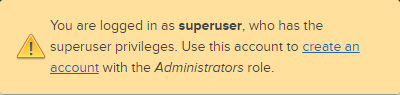
You are automatically redirected to the Accounts→Accounts page.
-
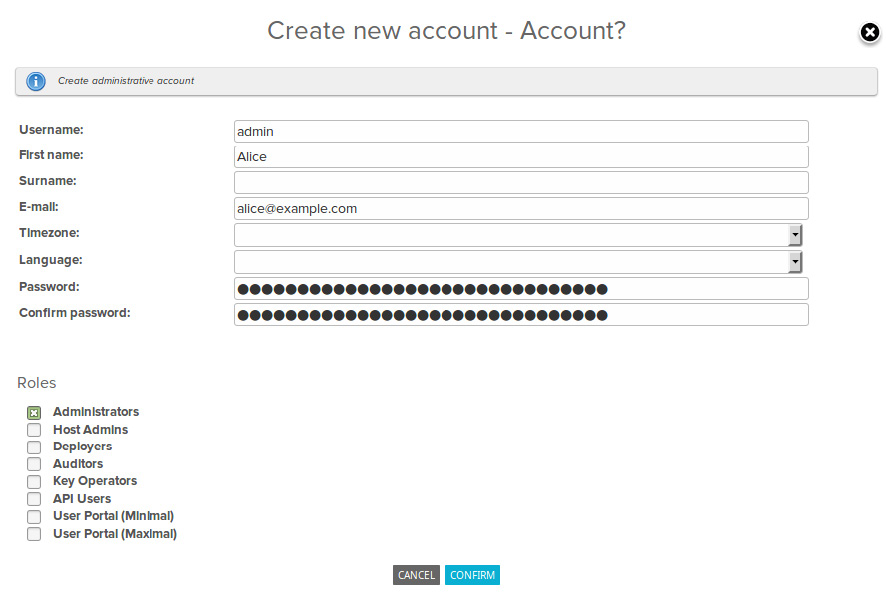
Click Create New Account to display the account-creation dialog.
In the account-creation dialog, specify the following:
-
Username and Password used for logging in with this account.
The password must conform to Key Manager Authentication requirements. By default, the password must contain both upper and lower case letters and at least two non-alphabetic characters, and it must not contain the user's user name. In addition, the password length be 8 or more characters.
-
The Email address of the user.
-
The Timezone of the user in Continent/City format.
-
Roles specifying the permissions of the account. In this case, select the Administrators role. The default Administrators role allows the user to manage other Key Manager accounts, and to perform most host and key management actions.
-
-
After you have created the administrative account with the Administrator role, you should log out with the superuser account and log in with the new Administrator account.
Log out by clicking
 located at the upper right of the page.
Then log in using the credentials of the newly created Administrator account.