API Token Life Cycle
API tokens expire once their maximum use age ends. To ensure that you can continue using the API in the future, you can set up reminders about upcoming token expirations.
The expiration notification setting is global and can not be configured per user or per token. Users must have their email configured so that they are able to receive the reminder notifications. The user email can be added by editing the user account at Accounts→Accounts.
Configuring Token Expiration Notification
To set up the token notifications, do the following:
-
Set up the token expiration notification period, which is the time period before the token expiry, during which the expiration notices are sent to token owners. To set up the notification period, navigate to Settings→Frontend page, and set the API token expiration notification period.
-
Set up the token expiration notification interval, which is a setting that specifies when the token owners will be sent token expiration notices. To set up the token expiration notification interval, navigate to Settings→General→Global and edit How often to notify users with expiring tokens. This setting is configured in the manner of other calendar-based settings, see Configuring Calendar-Based Settings. This setting is global and can not be configured per user or per token.
You have now configured the settings concerning token expiration notices.
Example of setting token expiration notification interval
The following image is an example of token expiration setting, where the token expiration notification is sent every Monday, Wednesday and Friday, starting at at 7:00 and ending at 8:00:
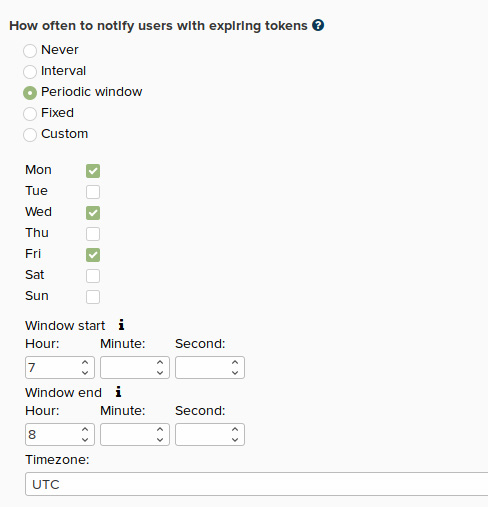
Figure 16.1. Example of token expiration setting
Token Expiration and Renewal
To renew an expiring token, navigate to Accounts→API tokens page, where you can delete the old API token and create a new one. Alternatively, you can extend the token's validity period with the Change validity option.
The validity period of a token can not exceed the maximum allowed token lifespan. The setting controlling the lifespan is found in the Settings→Frontend page, under Maximum API token expiration period.
When a token expires, user is sent an email notifying them of it.